If you work from home, your windows are either your best friend or your biggest distraction. Natural light keeps you alert, energized, and in a better mood throughout the workday. But uncontrolled sunlight — the kind that washes out your screen, turns your chair into a hot seat by 2 PM, and makes you look like a shadow on video calls — can drain your productivity faster than any email notification.
The right home office window treatments solve all of these problems at once. They reduce glare without turning your office into a dark box, regulate temperature so you’re comfortable all day, provide privacy when you need it, and create a polished backdrop for calls and meetings. The challenge is finding the treatment that handles your specific window orientation, desk setup, and daily light conditions.
This guide covers the best options for home offices, explains how to set up your treatments for flattering video calls, and makes the case for why motorized shades might be the smartest productivity upgrade you can make.
Why Your Home Office Windows Need the Right Treatment
Home office windows create a unique set of challenges that bedroom or living room windows don’t. You’re sitting in front of a screen for hours at a time, your face is on camera multiple times a day, and the sun’s angle changes constantly. Here’s what’s at stake:
- Screen glare and eye strain — Direct sunlight hitting your monitor reduces visibility, forces you to squint, and can cause headaches and eye fatigue by mid-afternoon. Even indirect glare from reflective surfaces makes sustained screen work uncomfortable.
- Video call backlighting — A bright window directly behind you turns you into a silhouette on Zoom, Teams, and Google Meet. Your colleagues see a dark outline instead of your face. It’s the single most common lighting mistake in home offices.
- Temperature swings — Sun-facing windows in a small office can raise the room temperature significantly during peak hours, forcing you to crank the AC or sweat through your afternoon. Conversely, poorly insulated windows lose heat in winter, making the space uncomfortably cold.
- Privacy — If your office faces the street or a neighbor’s window, you may need coverage during the day — not just at night. Open windows in a ground-level office can feel exposed during calls or focused work.
- Changing light throughout the day — Morning sun comes from a different angle than afternoon sun. A treatment that works at 9 AM may create problems at 3 PM. The best home office solutions are adjustable so you can adapt as conditions change.
The goal isn’t to block light entirely — it’s to control it. The right treatment lets you harness natural light’s benefits (energy, mood, alertness) while eliminating the downsides (glare, heat, visual noise).
The Best Window Treatments for Home Offices
These five options address the specific demands of a workspace. Each one handles glare, privacy, and temperature differently, so the best choice depends on your window orientation and how you use the room.
Solar Shades — Glare Control Without Losing Your View
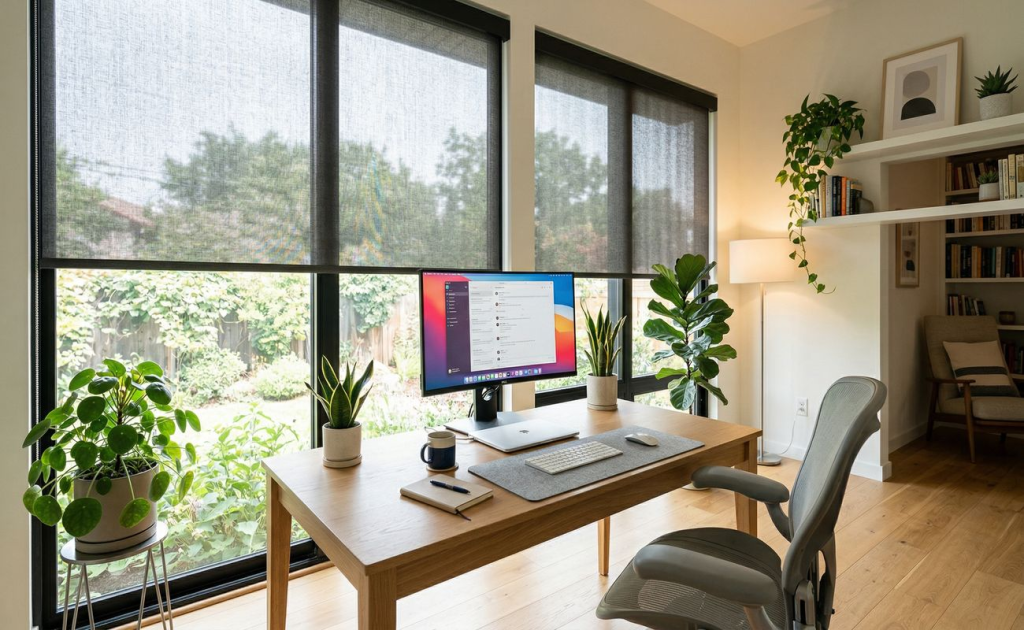
If screen glare is your primary frustration, solar shades should be at the top of your list. Also called screen shades, they’re made from a specialized mesh fabric that filters sunlight before it reaches your workspace — reducing glare and blocking UV rays while maintaining your view through the window. You can still see outside, but the harsh, direct light that washes out your screen is dramatically softened.
Hunter Douglas Designer Screen Shades are available in five opacity levels, so you can choose exactly how much light filtering you need based on your window’s sun exposure. Higher opacity blocks more light (ideal for south- or west-facing windows), while lower opacity preserves maximum visibility (better for north-facing or shaded windows). The UV protection also prevents fading on your furniture, flooring, and equipment.
Solar shades are the ideal choice for offices with large windows, scenic views you want to maintain, or desks positioned facing the window where glare hits the screen directly.
Roller Shades — Clean, Modern, Adjustable
Roller shades are the most versatile option for home offices. A single fabric panel rolls up into a slim headrail when you want full light, and rolls down for coverage when you need it. The clean, minimal profile keeps the window looking uncluttered — which also means a tidier background on video calls.
Hunter Douglas Designer Roller Shades come in over 370 fabric options, giving you complete control over both aesthetics and function. Light-filtering fabrics soften natural light and reduce glare without darkening the room — ideal for all-day work sessions. Blackout fabrics block light completely, which is useful if you have a projector, media wall, or need total darkness for presentations. For the ultimate flexibility, the Duolite® system pairs a light-filtering shade and a room-darkening shade on a single headrail, letting you switch between the two depending on the task at hand.
Cellular Shades — Temperature Control for All-Day Comfort
If your office heats up in the afternoon or feels cold near the window in winter, cellular shades solve the temperature problem that other treatments can’t fully address. The honeycomb air pockets provide an insulation layer at the window that regulates heat transfer in both directions — keeping the room cooler in summer and warmer in winter without relying entirely on your HVAC system.
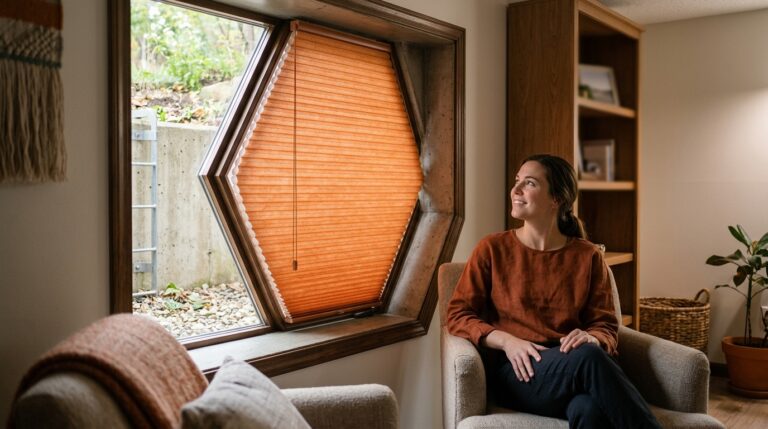
Beyond insulation, Duette® Honeycomb Shades also absorb sound. If your office is near a busy street or in a shared household, the noise-dampening effect helps create a quieter, more focused workspace. Light-filtering options reduce glare while keeping the room bright, and the top-down/bottom-up feature lets you block the street-level view for privacy while allowing daylight in from the top — a perfect configuration for ground-floor offices.
Sheer Shades — Diffused Light for a Professional Look
Sheer shades do something no other treatment type can: they transform harsh, directional sunlight into soft, even, diffused light that fills the room without creating hotspots or shadows. This quality makes them particularly effective for video calls, where balanced lighting across your face looks dramatically more professional than direct sunlight from one side.
Hunter Douglas Silhouette® Window Shadings feature S-shaped fabric vanes suspended between two sheer panels. You can tilt the vanes to redirect light — angling sunlight toward the ceiling for ambient glow, or closing them for more privacy — all while maintaining a softly lit room. Vane sizes are available in 2”, 3”, or 4”, giving you control over how much view-through you maintain when the vanes are open.
Sheer shades are the strongest choice for offices where you’re on camera frequently and want consistently flattering, natural-looking light throughout the day.
Shutters — Precise Control and a Polished Backdrop
Plantation shutters give you the most precise light control of any treatment type. The tiltable louvers let you redirect sunlight exactly where you want it — angle them downward to bounce light off the floor rather than your screen, or close them completely to block direct sun during peak glare hours. Unlike shades, which are either up or down, shutters let you make micro-adjustments throughout the day as the sun’s angle shifts.
The clean, architectural look of shutters also creates one of the best video-call backdrops. Evenly spaced louvers in a solid frame photograph well on camera — they read as polished and intentional without being distracting. For home offices in dry environments, Heritance® Hardwood Shutters or NewStyle® Composite Shutters deliver the warmth and refinement of real wood. The solid panel construction also provides better sound dampening than blinds or shades, helping reduce outside noise during calls and focused work.
How to Set Up Window Treatments for Video Calls
Lighting is the number-one factor in how you look on camera — more than your webcam quality, more than your background. And your window treatments are the primary tool for controlling it. Here’s how to optimize your setup:
If the window is behind you: This is the most common problem. The camera exposes for the bright window, turning you into a dark silhouette. Solution: use light-filtering roller shades, sheer shades, or solar shades to reduce the brightness behind you. You want to soften the backlighting enough that the camera can properly expose your face. Avoid blackout treatments during calls — they darken you along with the background.
If the window is in front of you: This creates glare on your screen and can cause squinting on camera. Solution: use solar shades or light-filtering roller shades to reduce the intensity of incoming light. You still benefit from the natural light facing you (it illuminates your face nicely for calls), but the treatment takes the harshness out of it.
If the window is to your side: This is the ideal position for video calls. Side lighting creates natural, flattering illumination on your face with soft shadows that add dimension. Use sheer shades or light-filtering cellular shades to control the intensity, and you’ll have studio-quality natural lighting without any additional equipment.
For changing conditions: The Duolite® dual-shade system is designed for exactly this challenge. It pairs a light-filtering fabric and a room-darkening fabric on a single headrail, letting you switch between the two instantly — light-filtering during calls, room-darkening for presentations, or anywhere in between.
Why Motorized Shades Are Ideal for Home Offices
In a home office, motorized shades aren’t a luxury — they’re a practical productivity tool. Here’s why they make sense for any dedicated workspace:
- Adjust without interrupting your work — Lower or raise shades from your desk with a remote, app, or voice command. No standing up, no reaching over furniture, no breaking your focus mid-task or mid-call.
- Schedule-based automation — Set your shades to lower automatically during peak afternoon sun and raise in the morning for energizing light. Once programmed, the adjustment happens daily without any input from you.
- Voice control integration — Hunter Douglas PowerView® Automation works with Amazon Alexa and Google Assistant. A simple “lower my office shades” command adjusts the light without you touching anything.
- Clean, professional aesthetic — No cords or chains hanging at the window. The streamlined look is better on camera and keeps the office looking polished.
- Multi-shade coordination — If your office has multiple windows, motorization lets you control all of them from a single app — raising and lowering each one independently or syncing them together.
For a deeper look at how smart window treatments integrate with your home ecosystem, read our guide to smart curtains and home automation.
Home Office Window Treatment FAQs
What Is the Best Window Treatment for Reducing Screen Glare?
Solar shades (screen shades) are the top choice for glare reduction because they filter sunlight at the window before it reaches your screen, while still allowing natural light and outside views into the room. Light-filtering roller shades and cellular shades are strong alternatives — they soften incoming light across a broader spectrum but don’t preserve the view-through that solar shades offer. For the worst glare scenarios (south- or west-facing windows with direct afternoon sun), a higher-opacity solar shade or a Duolite® dual-shade system gives you the most control.
How Do I Look Better on Video Calls With Window Treatments?
Position your desk so the primary window is to your side rather than directly behind or in front of you. If the window must be behind you, install light-filtering sheer shades (like Silhouette®) or roller shades to soften the backlighting — the camera needs to see your face, not a bright rectangle of light. Avoid fully closed blackout treatments during calls, which darken your face and make the room look dim on camera. The goal is soft, diffused, even light — not darkness, and not harsh directional sun.
Are Cellular Shades Good for a Home Office?
Cellular shades are one of the best all-around choices for home offices. They reduce glare with light-filtering fabrics, insulate against temperature swings (critical for small rooms that heat up fast), and absorb outside noise for a quieter workspace. The top-down/bottom-up option on Duette® Honeycomb Shades lets you maintain privacy at eye level while keeping natural light flowing in from the top of the window — a configuration that’s hard to beat for a productive, comfortable workday.
Create a Home Office That Works as Hard as You Do
The right home office window treatments turn your workspace into a room that supports focus, comfort, and professionalism from the first login to the last email. Solar shades handle glare. Roller shades offer versatile, adjustable coverage. Cellular shades regulate temperature and reduce noise. Sheer shades create flattering, camera-ready light. And shutters give you precise, louver-by-louver control with a clean backdrop. Browse our office window treatment projects for inspiration.
At The Curtain, we offer free home office consultations across New Jersey and New York. We’ll assess your window orientation, desk placement, and daily light patterns, then recommend the treatment that solves your specific challenges. With 18+ years of experience and 300+ five-star reviews, we’ll help you build an office that looks as productive as it feels.
Ready to upgrade your home office?
Schedule your free in-home consultation: (201) 302-9111 or Request a Consultation
The Curtain | Good Choice, Good Life | Family-Owned Since 2007
Request Your Free In-Home Consultation